
How to Audit Tracking Accuracy in Your SaaS Stack
Learn how to audit tracking accuracy in your SaaS stack. Catch silent data loss, validate event streams, and build reliable analytics your team can trust.
Introduction
Every SaaS team depends on event data to calculate funnel conversion rates, measure feature adoption, and build attribution models. Yet most teams never formally validate whether their tracking accuracy is reliable, operating on trust until a dashboard discrepancy forces an uncomfortable investigation. By that point, weeks or months of data loss have already poisoned downstream metrics. The gap between "tracking is implemented" and "tracking is trustworthy" is where the most consequential measurement errors hide, and closing that gap requires a structured audit methodology that covers every layer of the instrumentation stack.

Identifying Where Tracking Data Breaks Down
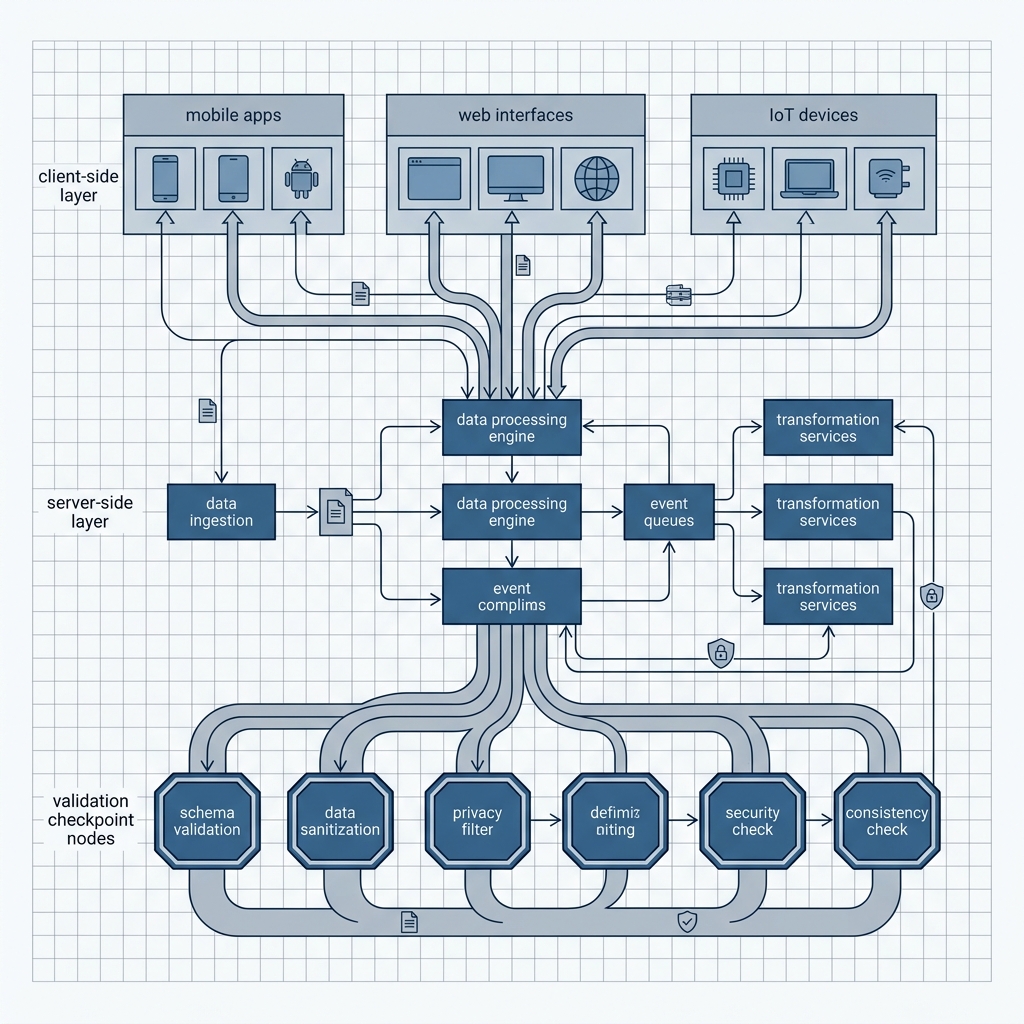
Before you can fix data accuracy in analytics, you need to map the entire lifecycle of an event from the moment it fires in a user's browser or app to the moment it lands in your warehouse or analytics tool. Data loss does not happen in one predictable place. It hides across network boundaries, consent layers, tag manager configurations, and ingestion pipelines. Understanding the typical failure points is the first step in any tracking audit methodology.
Common Failure Points in Client-Side Instrumentation
Client-side tracking is fragile by design. It runs in an environment you do not control, the user's browser, and it is subject to a growing list of interference mechanisms. Recognizing these failure points is essential for teams evaluating server-side vs client-side tracking architectures.
Ad blockers and privacy extensions: Browser extensions routinely block analytics scripts, which means events from a significant portion of users never fire at all
Consent management platforms: Misconfigured cookie banners can suppress tracking scripts before consent is granted, silently dropping events for users who never interact with the banner
Single-page application routing: SPAs that rely on virtual pageviews often misfire or double-fire events during route transitions if the tag manager is not configured for history change triggers
Race conditions in tag loading: When analytics tags load asynchronously, events can fire before the tracking library is initialized, resulting in lost data that produces no error
Network timeouts and failures: Mobile users on unreliable connections may generate events that never reach the collection endpoint, and most client-side SDKs do not retry failed requests by default
Silent Failures in Server-Side Pipelines
Server-side tracking solves many client-side reliability problems, but it introduces its own class of silent failures. Queue backlogs, schema mismatches, and misconfigured API credentials can cause events to be dropped without surfacing any user-facing error. A server-side tracking architecture that lacks dead-letter queues or alerting on ingestion failures will lose data just as quietly as a blocked client-side script. The difference is that teams often have more confidence in server-side pipelines, which makes the blind spot more dangerous.

A Repeatable Audit Framework for Tracking Validation
Knowing where data breaks is useful, but the real value comes from building a repeatable process that catches accuracy problems before they corrupt reports. The framework below covers four phases: schema validation, end-to-end event verification, cross-system reconciliation, and ongoing monitoring. Each phase targets a different class of tracking error, and together they form a comprehensive data validation practice that engineering and data teams can run on a regular cadence.
Schema Validation and Event Taxonomy Checks
Start by auditing the event taxonomy itself. Pull a complete list of every event your system is supposed to track, including event names, required properties, property types, and expected values. Compare this spec against what is actually arriving in your analytics tool or warehouse. Look for events that exist in the spec but never appear in data (dead events), events that appear in data but are not in the spec (rogue events), and properties that arrive with inconsistent types or null values.
Automated event taxonomy governance tools can run these checks continuously. Without automation, schedule a manual review at least quarterly. Pay close attention to timestamp formats, ensuring all events use a consistent standard like ISO 8601, and verify that user identifiers resolve correctly across anonymous and authenticated sessions. A clean taxonomy is the foundation for every other validation step. Teams working with tools like dbt can encode these expectations as automated data audits that run with every pipeline build.
End-to-End Event Verification and Cross-System Reconciliation
Schema checks confirm that events arrive in the right shape. End-to-end verification confirms that every event that should arrive actually does. The technique is straightforward: generate a known set of test events (a "ground truth" dataset), send them through the full instrumentation pipeline, and count what arrives at the destination. Any delta between sent and received events quantifies your data loss rate.
For conversion tracking accuracy specifically, reconcile counts between your application database and your analytics tool. If your database records 1,000 signups in a week but your analytics platform shows 870, that 13% gap is your measurement error. Segment this reconciliation by device type, browser, geography, and traffic source to isolate where the loss concentrates. Teams using identity resolution should also verify that cross-device user stitching is not inflating or deflating unique user counts.
Cross-system reconciliation is especially critical for multi-touch attribution models. If your ad platform, product analytics tool, and data warehouse each report different conversion numbers, your attribution model is built on unreliable inputs. Establish a single source of truth (typically the application database) and measure every other system's deviation from it.
Conclusion
Auditing tracking accuracy is not a one-time cleanup project. It is a recurring discipline that protects every analytics-driven decision your SaaS team makes. Start by mapping failure points across client-side and server-side layers, then build a repeatable framework covering schema validation, end-to-end event verification, and cross-system reconciliation. The teams that treat tracking validation as infrastructure (not an afterthought) are the ones whose dashboards, attribution models, and growth experiments actually reflect reality. TrackRaptor's SaaS tracking resources provide deeper guidance on each layer of this audit process, from event taxonomy best practices to production monitoring strategies.
Ready to make your tracking trustworthy? Explore TrackRaptor for practitioner-focused guides on building reliable SaaS instrumentation.
Frequently Asked Questions (FAQs)
How to audit tracking accuracy?
Map every event in your tracking spec, compare it against what actually arrives in your analytics destination, reconcile counts with your application database, and automate schema and volume checks on a recurring cadence.
What causes tracking data loss?
Ad blockers, misconfigured consent banners, race conditions in tag loading, network failures on mobile devices, and silent server-side pipeline errors are the most common causes of lost event data.
How to validate event data accuracy?
Send a known set of test events through your full pipeline and compare the count and shape of what arrives at the destination against what was sent, then segment any delta by device, browser, and traffic source.
Server-side vs client-side tracking accuracy: which is better?
Server-side tracking generally delivers higher accuracy because it bypasses ad blockers and browser-level interference, though it requires its own monitoring to catch silent ingestion failures.
What tracking validation tools do data engineers use?
Data engineers commonly use dbt tests for schema validation, Segment Protocols, or Avo for event governance, and custom reconciliation queries comparing application databases against analytics platforms.